Platform · 05 Investigate

Follow the evidence. Finish the case.

Start from a flagged event, an analyst concern or a customer report. SENTR brings the related activity, decision evidence and case work together—so your team spends time investigating, not assembling the story.

  • Contribution travels with the review item
  • Connection Ring for linked entities
  • Overrides require a written reason

Connected intelligence

Open the network behind the event.

An event can look ordinary until you see the same device, session or instrument in other activity. Rebuilding those relationships manually slows every investigation.

SENTR resolves five profile families: users/accounts, devices, sessions, IPs and payment methods. Each brings together activity, risk indicators, alerts, open cases and linked profiles from the identifiers you supply.

SENTR Product viewDemo data
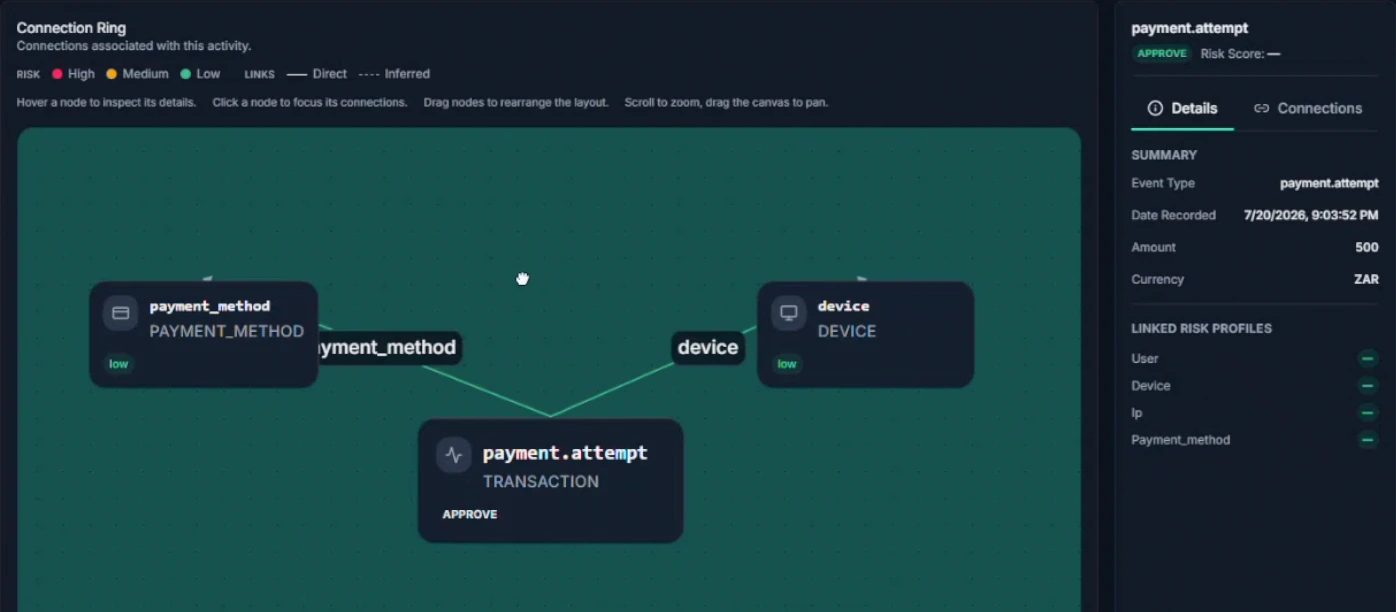
SENTR Connection Ring linking a payment-attempt event to a device and payment method, with a selected-node detail panel. Enlarge view
Follow the connection, not another spreadsheet

A payment event and its linked device and instrument in Connection Ring. A connection is an investigation lead, not a verdict.

Inspect the relationship and keep the underlying event in view.

Follow the connection, not another spreadsheet

A payment event and its linked device and instrument in Connection Ring. A connection is an investigation lead, not a verdict. Product demonstration · synthetic data.

Go deeper: Connected intelligence
Move from account to context
Overview, Activities, Linked Profiles, Cases and Connections give analysts a consistent way to explore each entity. Linked profiles expose risk, activity counts and first/last activity.
Follow the Connection Ring
Inspect direct and inferred relationships in an interactive graph. Focus a node, inspect connections, rearrange and zoom to trace related accounts, devices and instruments.
Start from the report, not only the alert
Create a case directly from a profile when a customer reports takeover or another concern. You do not need to wait for a new flagged payment to begin investigating.

Turn a suspicious connection into an investigation with context. Shared identifiers are leads—not proof of collusion or guilt.
Investigation operations

Give every review an owner, a method and an outcome.

An undifferentiated alert inbox hides urgent work, repeats context gathering and leaves closed cases with conclusions nobody can compare.

Cases can start from a policy, an analyst or an external report. Group the source reference, subjects, linked activities and evidence in one workspace, then route the work through queues your team can operate.

SENTR Product viewDemo data
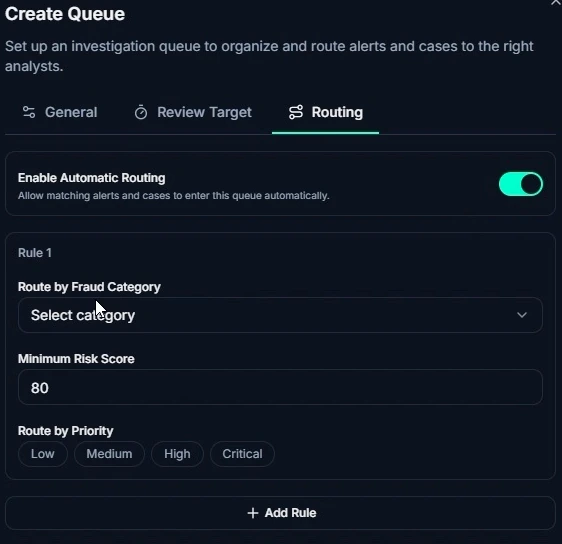
SENTR queue-routing controls for automatic routing, fraud category, minimum risk score and priority. Enlarge view
Give review work a deliberate destination

Configure queue routing by fraud category, risk score and priority.

Direct the right work to the right queue instead of treating every alert alike.

Give review work a deliberate destination

Configure queue routing by fraud category, risk score and priority. Product demonstration · synthetic data.

Go deeper: Investigation operations
Manage the work, not just the alert
Queues carry assignment, priority, aging and SLA tracking. Investigation dashboards show waiting work, case workload and analyst workload so managers can see where attention is needed.
Configure the investigation method
SENTR.Citadel lets you define case statuses, workflow transitions and investigation checklists. Different fraud problems can have different review paths without abandoning a shared case record.
Record what the person decided
An override requires a written reason and records the person, time, previous decision and new decision. Close the case with your configured business outcome and reason code; keep uncertainty distinct from confirmed fraud.

Make experienced judgement reusable and review work inspectable. Case closure records an operational outcome; it does not settle a financial dispute.

Give your analysts the context, not the assembly work.

Detection in one vendor, cases in another, and entity linkage in a warehouse extract turns every serious review into a mini-project. Rings and mule patterns thrive in that gap—analysts find the cluster after loss, or after a partner escalation nobody owned.

Investigation depth depends on identifiers and history from Data & integrations. SENTR.Citadel is where operators work that depth; SENTR.Tower uses a simpler guided view—see SENTR.Tower versus SENTR.Citadel.

Illustrative mechanism
Follow the case beyond the flagged event.An event enters review with connected account, device and payment context. An investigator examines those relationships and collects evidence in the case before recording an outcome. A shared identifier is a lead, not proof of fraud. The diagram is a workflow illustration, not a product screenshot.INVESTIGATION PATHEVENTREVIEWAccountDevicePaymentCASE · IN REVIEW
Follow the case beyond the flagged event.
Read the diagram

An event enters review with connected account, device and payment context. An investigator examines those relationships and collects evidence in the case before recording an outcome. A shared identifier is a lead, not proof of fraud. The diagram is a workflow illustration, not a product screenshot.

Follow the case beyond the flagged event.

Illustrative mechanism. On smaller screens, scroll across the diagram to inspect the labels.

Follow the case beyond the flagged event.An event enters review with connected account, device and payment context. An investigator examines those relationships and collects evidence in the case before recording an outcome. A shared identifier is a lead, not proof of fraud. The diagram is a workflow illustration, not a product screenshot.INVESTIGATION PATHEVENTREVIEWAccountDevicePaymentCASE · IN REVIEW

An event enters review with connected account, device and payment context. An investigator examines those relationships and collects evidence in the case before recording an outcome. A shared identifier is a lead, not proof of fraud. The diagram is a workflow illustration, not a product screenshot.

See the network behind the event

A review item should already carry the decision reason and the linked entities worth inspecting — before anyone rebuilds the ring in a spreadsheet.

DECISION · REVIEW Payout €2,450 CASE Linked payout review Acct A Acct B Device · shared IBAN · reuse Device · overlap Email · age Illustrative · not a production screenshot Illustrative · synthetic records DECISION · REVIEW Payout €2,450 Linked payout case Acct A Acct B Device · shared Device · overlap IBAN · reuse Email · age
Shared identifiers are investigation signals. They are not automatic proof of collusion or guilt.

How a review moves

From queue to outcome

  1. Open the review with the reason

    See the event and which rules, lists or policy bands put it in queue—not a bare alert ID.

  2. Inspect entity history

    Account, device, payment instrument or beneficiary history from the identifiers you mapped.

  3. Follow the Connection Ring

    Related entities and activity stay attached so rings are not rebuilt in a spreadsheet.

  4. Case, override, outcome

    Attach evidence, decide, record a written reason when you override, and leave the outcome on the decision record.

Follow a case beyond the first account.

Illustrative workflow

One payout review expands into a three-merchant ring

A payout review opens with beneficiary-reuse contribution. Entity history shows a new account. Connection Ring surfaces two other merchants sharing the same payout destination and overlapping devices.

  1. Payout review
  2. Beneficiary reuse
  3. Connection Ring
  4. Three merchants
Response
Investigate links · record supported decisions · tag confirmed outcomes for list updates
Evidence
Three decision records collected on one case

Portfolio risk is visible without a custom BI pull for every incident.

Outcomes feed the improvement loop in Workflows & human feedback.

Keep the work connected

What happens next?

What comes in
A review, an analyst concern or an external fraud report.
What moves forward
A supported case outcome, with its evidence, owner and reason.

Put the outcome to work in reports, controls and eligible model feedback.

Continue to Improve

SENTR.Tower includes case work with a simpler review experience. SENTR.Citadel gives your team deeper control of queues, checklists and workflows.

Compare the exact controls ↗

Stop rebuilding the story for every case.

Follow an event into its connected activity, evidence and recorded outcome. Ask for a walkthrough focused on the cases your team needs to resolve.

Your privacy choices

Choose how you use SENTR. Your enquiry, chat and booking do not depend on accepting analytics.

Essential functionality Always active

Delivers and secures the site, remembers this choice and supports the chat or booking you request.

Measures page visits, feature use and enquiry journeys, including recognised campaign sources. Uses analytics cookies. Form answers and chat messages are not sent to Google Analytics.

Advertising trackers are disabled. The same choices apply to UK and EU visitors.

We remember this choice on this browser for up to six months. Changing an active analytics choice reloads the page to stop tracking scripts. Save any unfinished enquiry first.

Website data information