Capability · Investigate

Follow the evidence. Not a trail of browser tabs.

Start with why the event was flagged. Follow the account, device and payment connections. Build the case and record the outcome in one workspace—so your team spends its expertise on the investigation, not assembling it.

  • Queues with contribution attached
  • Connection Ring for linked entities
  • Overrides require a written reason

Every missing connection becomes more manual work.

When detection lives in one vendor, cases in another and entity linkage in a warehouse extract, every serious review becomes a mini-project. Rings and mule patterns thrive in that gap.

Illustrative mechanism
Follow the case beyond the flagged event.An event enters review with connected account, device and payment context. An investigator examines those relationships and collects evidence in the case before recording an outcome. A shared identifier is a lead, not proof of fraud. The diagram is a workflow illustration, not a product screenshot.INVESTIGATION PATHEVENTREVIEWAccountDevicePaymentCASE · IN REVIEW
Follow the case beyond the flagged event.
Read the diagram

An event enters review with connected account, device and payment context. An investigator examines those relationships and collects evidence in the case before recording an outcome. A shared identifier is a lead, not proof of fraud. The diagram is a workflow illustration, not a product screenshot.

Follow the case beyond the flagged event.

Illustrative mechanism. On smaller screens, scroll across the diagram to inspect the labels.

Follow the case beyond the flagged event.An event enters review with connected account, device and payment context. An investigator examines those relationships and collects evidence in the case before recording an outcome. A shared identifier is a lead, not proof of fraud. The diagram is a workflow illustration, not a product screenshot.INVESTIGATION PATHEVENTREVIEWAccountDevicePaymentCASE · IN REVIEW

An event enters review with connected account, device and payment context. An investigator examines those relationships and collects evidence in the case before recording an outcome. A shared identifier is a lead, not proof of fraud. The diagram is a workflow illustration, not a product screenshot.

One investigation, from alert to outcome.

One continuous path from alert to outcome.

DECISION · REVIEW Payout €2,450 CASE Linked payout review Acct A Acct B Device · shared IBAN · reuse Device · overlap Email · age Illustrative · not a production screenshot Illustrative · synthetic records DECISION · REVIEW Payout €2,450 Linked payout case Acct A Acct B Device · shared Device · overlap IBAN · reuse Email · age
Shared identifiers are investigation signals. They are not automatic proof of collusion or guilt.

Linked investigation walkthrough

  1. Queue & reason

    Open the reviewed event with the contribution that put it there—not a bare score.

  2. Entity history

    Inspect the account, device, payment instrument or beneficiary history you have mapped.

  3. Connection Ring

    Follow linked entities and related activity without rebuilding the graph in a spreadsheet.

  4. Case & override

    Attach evidence, decide, and record a reason when you override the system path.

  5. Outcome

    Close with an outcome that stays on the decision record for later improvement.

What this looks like in practice

Three merchants, one beneficiary cluster

A review queue item on merchant A shows contribution from beneficiary reuse. Connection Ring surfaces two other merchants sharing the same payout destination and overlapping devices.

  1. Merchant A review
  2. Beneficiary reuse
  3. Connection Ring
  4. Merchants B + C
Response
Investigate links · record supported decisions · tag the outcome
Evidence
Three decision records collected on one case

Portfolio risk becomes visible without a custom BI pull for every incident.

Connected investigation

Queues, cases, Connection Ring and reasoned overrides connect the investigation. The identifiers and history you map determine how much context analysts can follow. Autonomous case closure and automated dispute filing are not available today.

Investigation operations

Give every review an owner, a method and an outcome.

An undifferentiated alert inbox hides urgent work, repeats context gathering and leaves closed cases with conclusions nobody can compare.

Cases can start from a policy, an analyst or an external report. Group the source reference, subjects, linked activities and evidence in one workspace, then route the work through queues your team can operate.

SENTR Product viewDemo data
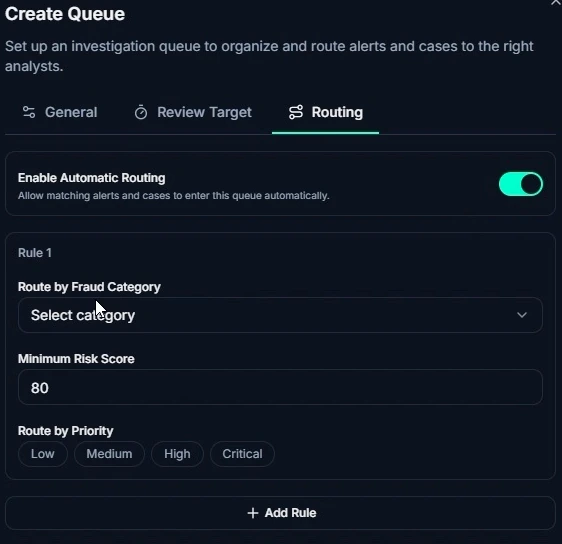
SENTR queue-routing controls for automatic routing, fraud category, minimum risk score and priority. Enlarge view
Give review work a deliberate destination

Configure queue routing by fraud category, risk score and priority.

Direct the right work to the right queue instead of treating every alert alike.

Give review work a deliberate destination

Configure queue routing by fraud category, risk score and priority. Product demonstration · synthetic data.

Go deeper: Investigation operations
Manage the work, not just the alert
Queues carry assignment, priority, aging and SLA tracking. Investigation dashboards show waiting work, case workload and analyst workload so managers can see where attention is needed.
Configure the investigation method
SENTR.Citadel lets you define case statuses, workflow transitions and investigation checklists. Different fraud problems can have different review paths without abandoning a shared case record.
Record what the person decided
An override requires a written reason and records the person, time, previous decision and new decision. Close the case with your configured business outcome and reason code; keep uncertainty distinct from confirmed fraud.

Make experienced judgement reusable and review work inspectable. Case closure records an operational outcome; it does not settle a financial dispute.
Stop rebuilding the story for every case.

Bring a difficult case. We will show how the event, linked activity, explanation and reviewer actions stay connected.

Or Book a Session

Your privacy choices

Choose how you use SENTR. Your enquiry, chat and booking do not depend on accepting analytics.

Essential functionality Always active

Delivers and secures the site, remembers this choice and supports the chat or booking you request.

Measures page visits, feature use and enquiry journeys, including recognised campaign sources. Uses analytics cookies. Form answers and chat messages are not sent to Google Analytics.

Advertising trackers are disabled. The same choices apply to UK and EU visitors.

We remember this choice on this browser for up to six months. Changing an active analytics choice reloads the page to stop tracking scripts. Save any unfinished enquiry first.

Website data information