The SENTR closed loop
A score is a start.
Close the loop.
Catch the pattern. Make the call. Understand why. SENTR connects the whole fraud operation—so your team can act on the evidence and improve the controls behind it.
One platform. SENTR.Citadel and SENTR.Tower.
Rules, machine learning and AI explanations—with your team in control.
Evidence stays connected.
Your operation keeps moving.
Follow the logic
One bonus claim.
The bigger picture.
An iGaming bonus claim is our example. The same operating loop can connect payment attempts, account activity and your own event types—using the signals and controls relevant to each.
Illustrative workflow, not a measured customer result. The real product views below use demo data from separate sessions; they are not a recording of this example.
Explore SENTR for iGaming01 Ingest
A new event. Not a blank slate.
Fraud hides in the gaps between systems. Bring events and their history together so a new claim is not judged in isolation.
- Map APIs, webhooks, files, databases or streams to the context your checks need.
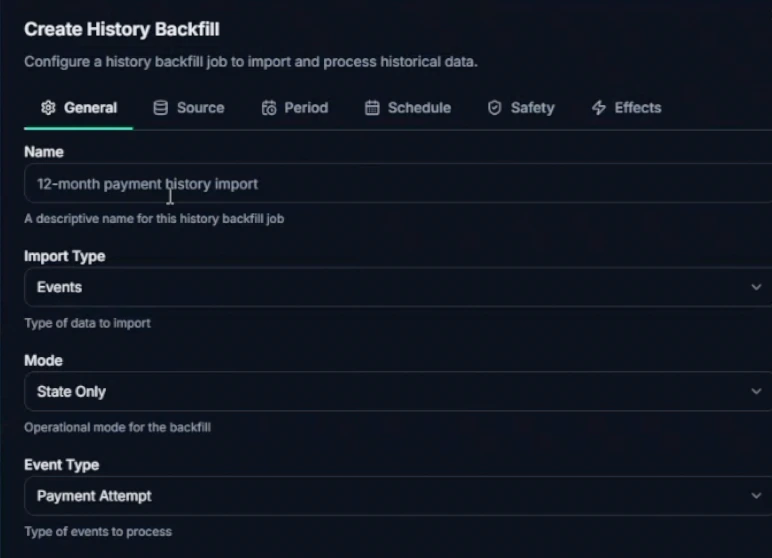
- Backfill history with a defined scope and processing mode. Validate the mapping before relying on it.
 Enlarge view
 History-backfill setup. Scope the activity and processing mode before starting the import.
Historical activity gives first-seen, reuse and velocity checks the context they need.
A bonus_claim arrives. Map account and device identifiers, then connect the relevant account activity and previous claims.
An event with usable context—not just another payload.
Ingest: the controls in detail
Custom event types are supported. Browser signals still need collection: a REST integration cannot manufacture device interactions it never received.
02 Detect
Your fraud patterns. Your controls.
Turn the patterns you know into precise rules. Use customer-specific anomaly detection to surface activity that deserves a closer look.
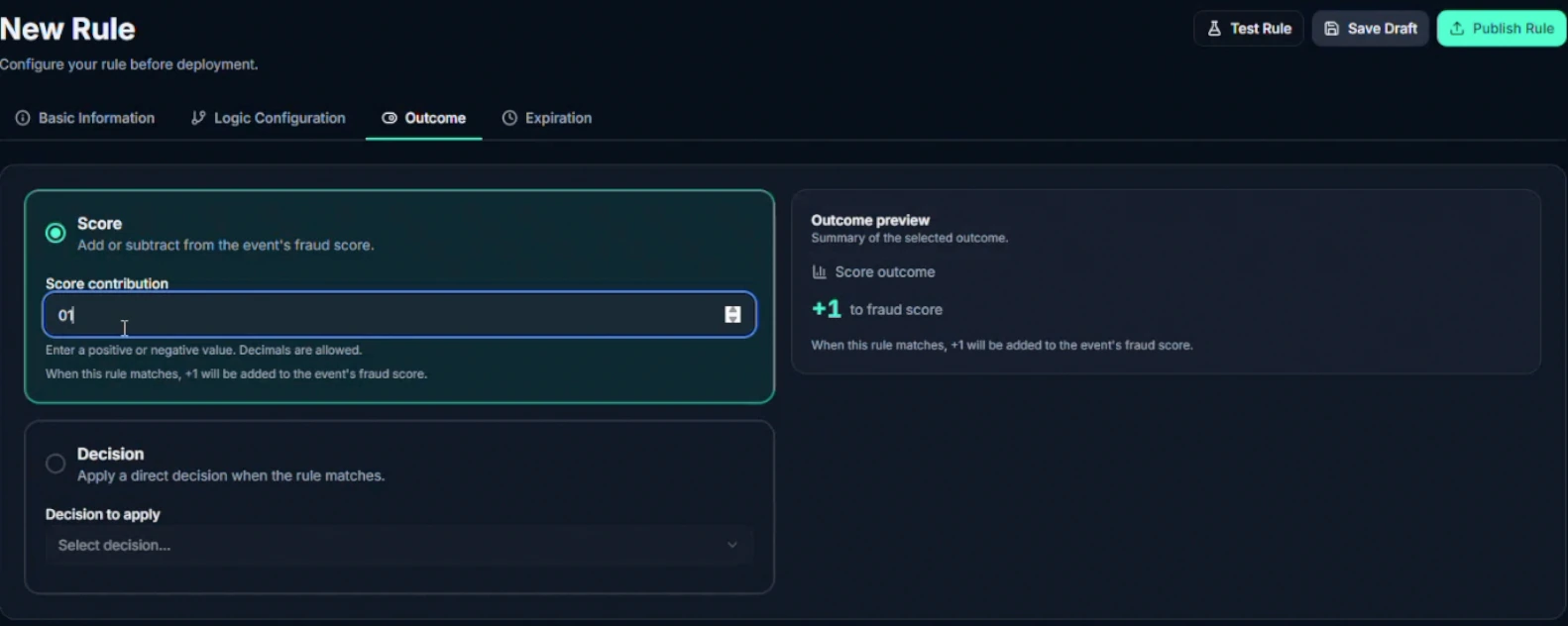
- Combine conditions, lists and score contributions—or give a matching rule a direct decision.
- Inspect rule findings alongside the customer anomaly-model signal. They are distinct inputs, not one unexplained score.
 Enlarge view
 The rule outcome editor separates a score contribution from a direct decision.
Watch the controls 16 seconds · silent
A silent tour of rule configuration: open comparison, data-match and velocity options; inspect the score contribution; select a direct Review decision; open expiration settings.
Define the condition. Choose its effect. Inspect the outcome before publishing.
Check the claim against bonus-abuse rules and linked activity. Look for suspicious repetition—not simply the fact that two people share a device.
Findings you can inspect, test and challenge.
Detect: the controls in detail
Drafts, versions, previews and backtests help operators assess a change. Monitor lets a rule run without affecting decisions. A scoring profile changes sensitivity inside rules; it is not the same as a decision-policy cutoff.
03 Decide
Make your risk appetite actionable.
A finding needs a response. Set the policies that turn risk into an approval, a block or a deliberate request for human review.
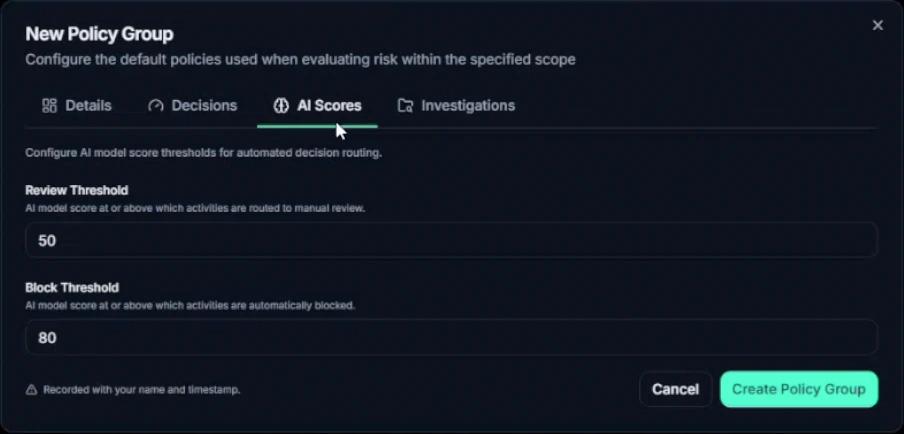
- Keep rule and model thresholds explicit, with policies scoped to the activity you protect.
- Return the decision to your application. Your integration controls what actually proceeds or stops.
 Enlarge view
 Review and block cutoffs are configured separately. Displayed values are demo settings, not recommended thresholds.
Rule sensitivity, decision cutoffs and list influence answer different questions.
For this example, the configured policy returns Review. An action policy can route the work and notify the responsible team.
A clear decision and an accountable next step.
Decide: the controls in detail
Approve and Block do not require a manual investigation for every event. Review is a branch, not a mandatory stop. An external fraud report can also start a case later.
04 Explain
No “because the score said so.”
Give the person answering for a decision something better than a number. Keep the contributing findings attached to the event.
- Follow the evidence behind a finding instead of reconstructing it across tools.
- AI translates relevant findings into natural language. It explains the decision; it does not make it.
 Enlarge view
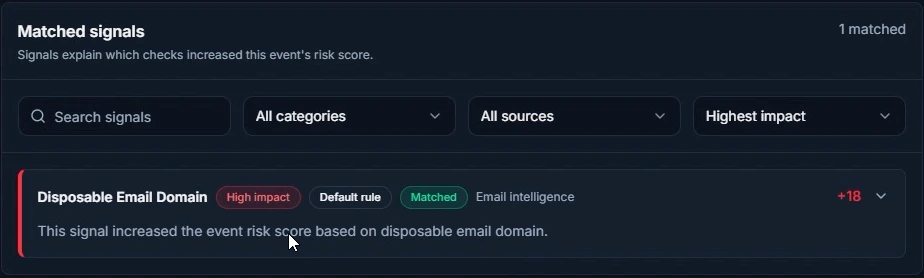
 The matched rule, its impact and the recorded reason—together on the event.
The explanation has something concrete behind it: the matched check and its contribution.
The reviewer can inspect the checks that matched and their recorded contributions before deciding whether the bonus claim is abuse.
A decision your team can understand and question.
Explain: the controls in detail
Explanation is available with the decision—not unlocked only after investigation. Recorded attribution and generated prose are different: not every quiet event needs an AI narrative.
05 Investigate
Follow the pattern beyond the alert.
One suspicious event rarely tells the whole story. Explore connected activity, bring the evidence into a case and give the work an owner.
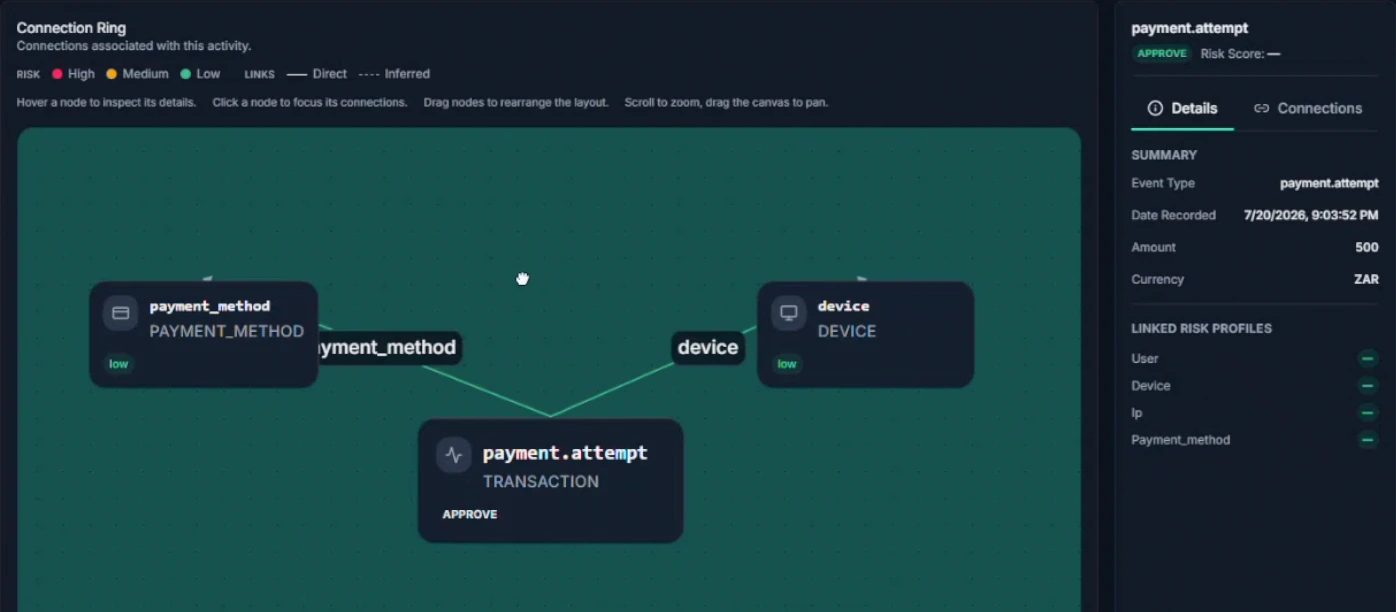
- Explore links across accounts, devices, sessions, IPs and payment methods.
- Work through queues, priorities and case workflows. Record a written reason when changing a decision.
 Enlarge view
 A payment event and its linked device and instrument in Connection Ring. A connection is an investigation lead, not a verdict.
Inspect the relationship and keep the underlying event in view.
Inspect related accounts, the device and claim history. Coordinated repeat claims may support abuse; a legitimate shared household may explain the connection.
An evidenced outcome—not an unsupported hunch.
Investigate: the controls in detail
A shared device or IP is an investigation lead, not proof of fraud. Human changes preserve the person, time, previous decision and new decision so system findings and human judgement remain distinguishable.
06 Improve
Make the next change an informed one.
An outcome should do more than close a case. Use it to find the noisy rule, missing context or policy that needs attention.
- Use rule analytics and operational reports to decide where improvement work belongs.
- Feed quality-controlled outcomes into eligible model-training processes. Test control changes before putting them to work.
 Enlarge view
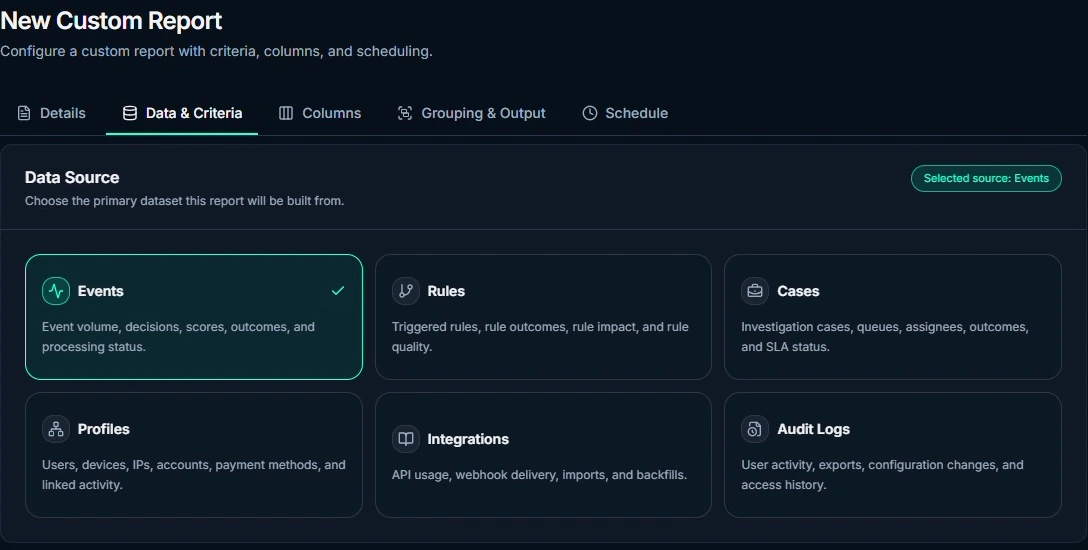
 SENTR.Citadel’s custom report builder: choose a data source, then shape criteria, columns, grouping and schedule.
Start with the operational question—not the spreadsheet export you happen to have.
If legitimate claims were caught, inspect why. Repair a missing field, test a narrower rule or adjust the relevant policy—then check the effect.
A loop back to better inputs and better-informed controls.
How the feedback loop works
One corrected decision does not instantly retrain the model or guarantee a better next decision. Customer-model training depends on sufficient clean data and its scheduled process. Custom report building, shown here, is a SENTR.Citadel control.
Same intelligence. Different operating depth.
Choose how much you want to control.
You have seen the full platform workflow. SENTR.Tower keeps the engine, explanations and case work, with presets and simpler configuration. SENTR.Citadel opens up the deeper controls.
SENTR.Tower
For teams that need protection without a full-time fraud operation. Start with guided presets, respond to alerts and investigate decisions that need attention.
Explore the guided operating model ↗SENTR.Citadel
For operators who want to shape rules, policies, workflows and custom reporting around their market, event types and risk appetite.
Explore the complete product ↗Put the claim to the test
Your events.
Your current controls.
Our proof.
For qualified SENTR.Citadel evaluations, free 50-day Shadow Mode runs read-only beside your current controls. Compare findings and investigate disagreements before deciding what should change.
Explore Shadow Mode ↗An optional proof route—not a condition for every customer. SENTR.Citadel starts with a conversation and infrastructure discovery. SENTR.Tower has a guided 14-day start, subject to fit and readiness.
Your seat on the committee
Evaluating with your team?
Technical fit, day-to-day operations or the business case: explore the questions that matter to your role, then bring your team into the conversation.
- Fraud / risk operator You own rules, queues and case quality. See what matters for you →
- COO / payments / founder You need effective fraud controls and a workable operating cost. See what matters for you →
- Technical owner You own schemas, access and the production boundary. See what matters for you →
- Security / compliance You need evidence on data handling and decision accountability. See what matters for you →
- Executive / finance You need a transparent cost model and credible evidence of value. See what matters for you →
- Procurement / legal You need vendor identity, scope, responsibilities and exit terms. See what matters for you →
- SENTR.Tower reviewer You respond when a decision needs human attention. See what matters for you →
Bring the workflow your current stack struggles with.
A recurring fraud pattern. A noisy rule. A case that takes too long. Let’s walk through the relevant controls together and agree the right next step.