Define the conditions
Use the typed field picker and AND/OR groups against current-event signals, history and linked activity. Scope the rule to the event type it protects.
Platform · 03 Decide
A new market. A new promotion. A fraud pattern your old thresholds no longer catch. SENTR.Citadel lets your operator build and test rules, adjust scoring profiles and set decision policies around the way your business actually works.
Detection workbench
A new attack should not force a choice between waiting for a vendor change and publishing an untested rule that fills the review queue.
Start with global and industry presets from a library of 300+ rules across event types. SENTR.Citadel operators can then author event-scoped conditions using a typed field picker and AND/OR groups against mapped signals and history.
 Enlarge view
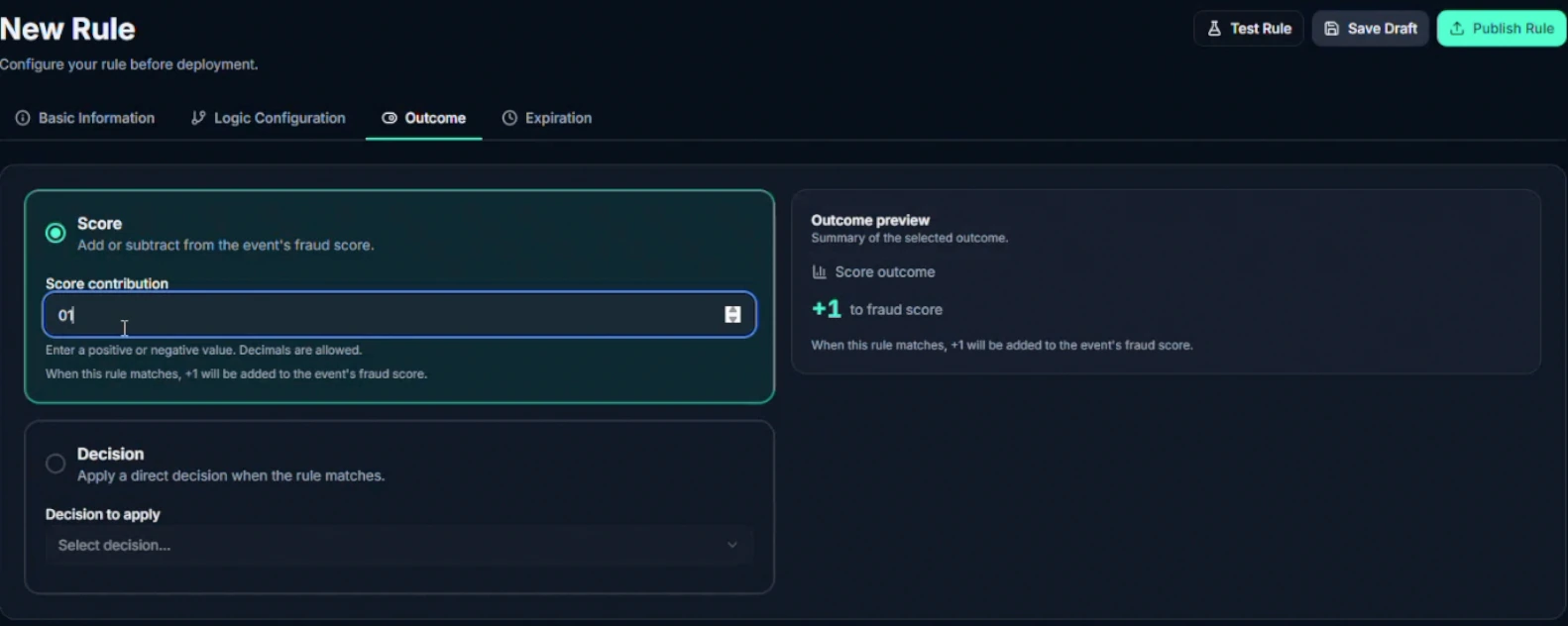
 The rule outcome editor separates a score contribution from a direct decision.
A silent tour of rule configuration: open comparison, data-match and velocity options; inspect the score contribution; select a direct Review decision; open expiration settings.
Define the condition. Choose its effect. Inspect the outcome before publishing.
Respond to a new pattern with an inspectable change. Measure the effect before assuming the new control is better.
Risk appetite
Making every rule stricter is not the same as changing when you block. A trusted identifier should not automatically excuse every future action either.
SENTR separates rule sensitivity, decision thresholds and list influence. That gives your operator a more precise way to adapt policy to the event, market and fraud problem.
 Enlarge view
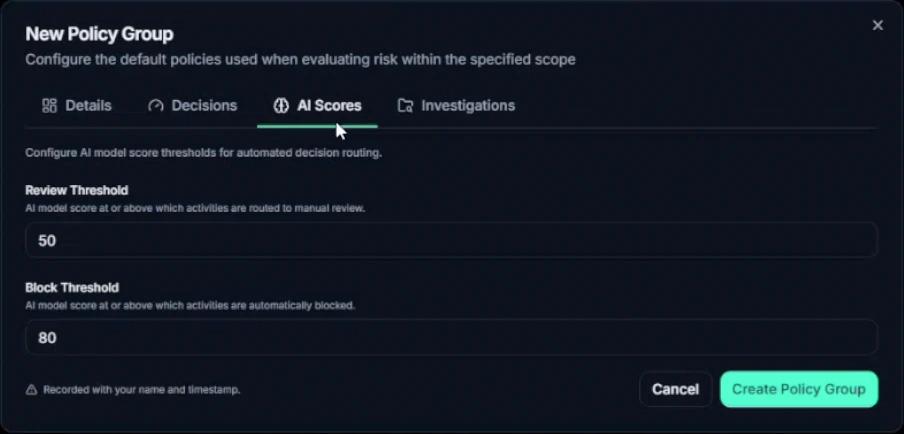
 Review and block cutoffs are configured separately. Displayed values are demo settings, not recommended thresholds.
Rule sensitivity, decision cutoffs and list influence answer different questions.
Change the control that is causing the problem—not the risk appetite of the whole business.
Complete custom rules—not just a choice between preset sensitivity levels. SENTR.Citadel gives operators the same construction tools used to express the controls around their own events and mapped fields.
Use the typed field picker and AND/OR groups against current-event signals, history and linked activity. Scope the rule to the event type it protects.
Add or subtract a score contribution, including decimals, or choose a direct decision. Inspect the outcome preview and follow each matched rule's attribution on the evaluated event.
Draft, version, test, backtest and set expiration. Use Monitor to evaluate a rule without affecting live scores before deciding whether to publish it.
See how the scoring engine keeps contributions inspectable →
AI-assisted authoring · available
The AI rule builder supports AI-assisted rule creation and assessment alongside the full custom-rule workbench. They are distinct from the AI that translates recorded findings into plain-language explanations today.
Your operator can already construct, test and publish custom rules using the controls above. We walk through the supported AI-assisted workflow, configuration and approval permissions during setup. Availability does not imply that an agent can independently publish changes to live policy.
Global thresholds treat login, payment and payout as the same appetite. Mystery models cannot be walked back to a rule anyone owns. Tuning becomes politics. Partner escalations become archaeology.
Composition quality still depends on the events and fields you map—see Data & integrations. The controls below turn that context into an approve, review or block decision your team can inspect and refine.
On this illustrative 0–100 score axis, review starts at 60 and block at 85. A score of 72 falls in review. These are example values, not recommended defaults. Separate model findings and direct-decision rules require the configured policy logic; your connected application enforces the returned response.
Rules and anomaly detection provide separate score axes. Decision policy sets the response; action policy triggers the next workflow.
How a decision is composed
Illustrative workflow
After a ring incident, a fraud owner drafts a payout velocity rule. Monitor evaluates it on recent traffic without changing live scores. Backtest shows contribution on the intended merchant cluster.
The change is intentional and reversible—not silent drift.
When policy routes to review, context continues in Investigations.
Your policy determines the response to the event. Your connected application enforces the business action.
Return an approval when configured controls permit it. The application decides how to continue; an ordinary event need not wait for an analyst.
Route uncertainty into a deliberate workflow. Action policies can create a case, notify a team or send a webhook; the integration defines what happens while review is pending.
Return a block decision when the configured controls require it. Stopping a payment, restricting a session or another business response remains the application's responsibility.
Explanations accompany the decision. A later human override requires a written reason; it does not itself settle a dispute. Inspect the evidence trail →
Discuss policy scope, rule interactions and enforcement in an Architecture Session →
Keep the work connected
The decision is only useful if you can inspect the reason behind it.
Continue to ExplainSENTR.Citadel opens the deeper rule and policy controls. SENTR.Tower uses guided presets. Your organisation remains responsible for the business response.
Compare the exact controls ↗Before you decide
SENTR.Citadel supports event-scoped conditions, AND/OR groups and custom score contributions or direct decisions. Operators can draft, version, test and backtest rules. Monitor evaluates a rule without contributing to live scores before the team decides whether to publish.
Explore the rule workbench →AI assistance is available alongside the rule-authoring workflow. Its availability does not mean an agent independently publishes changes to live policy. Confirm the supported suggestion, validation and approval workflow for your setup. Autonomous policy agents remain a separate roadmap item.
See AI-assisted authoring →Bring a rule that is too noisy, too rigid or too slow to change. Work through the signals, scoring contribution, test plan and people who will own it.