SENTR.Citadel

Fraud evolves. Take control of what happens next.

Build the rule. Test the change. Follow the pattern. SENTR.Citadel gives your operators the full controls of SENTR’s AI-powered fraud operations platform—from event-specific policies to connected cases and custom reporting.

  • Rules, policies, queues and investigations you own
  • Coexist with current providers while you evaluate
  • Free 50-day Shadow Mode when qualified — optional

The complete operation. Open the part you want to improve.

SENTR.Citadel puts the configuration workbench and the investigation workspace in your team’s hands. Start from industry presets, then shape the events, rules, risk appetite and workflows around your operation.

Jump directly to a product workbench

Prefer guided configuration? SENTR.Tower keeps the same scoring, AI explanations and casework foundation with fewer controls to manage. Compare what you can do and change →

How operators compose a decision

Connect mapped events to rule logic, customer-specific anomaly scores and your decision policies.

How a decision is composed

  1. Mapped events Provider outputs and internal events you supply—inputs, not assumed native connectors.
  2. Rules, lists & profiles Deterministic control and scoring appetite you configure per event type.
  3. Decision & action policy Allow, review, block, case, notify, webhook—thresholds and downstream actions you own.
  4. Machine learning & AI explanations Rules, customer-specific anomaly scoring and AI scoring, with AI rule-building assistance and the ML pipeline. Inspect the findings and agree the relevant controls.

01 / Ingest

Give every decision the context it needs.

Explore ingest in depth →

01 / Data engine

Your first live event should not arrive without a past.

A returning customer can look new when the history lives elsewhere. That missing context creates work for analysts and weakens the rules that depend on prior activity.

Bring events through REST APIs, webhooks, files, databases or streams. Map your field names onto SENTR’s model and keep stable identifiers connected across users, devices, sessions, IPs and payment methods.

Explore mapping, history and integration →
SENTR Product viewDemo data
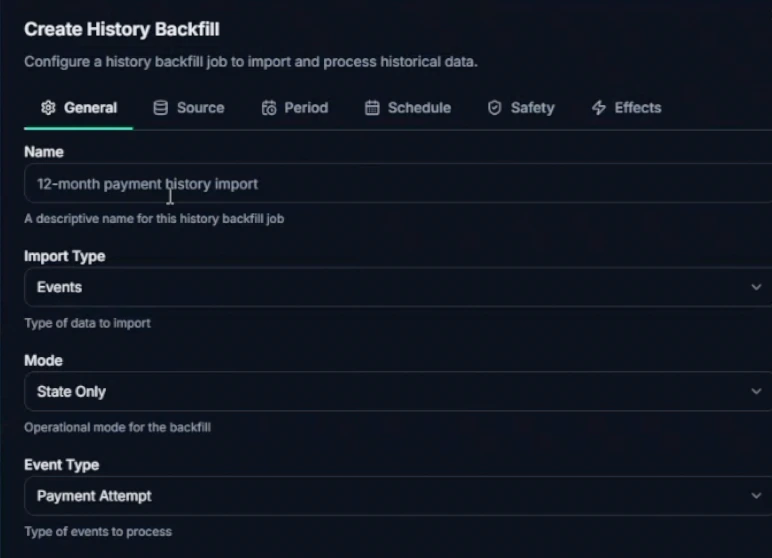
SENTR history-backfill configuration showing import type Events, State Only mode, Payment Attempt event type, and source, period, schedule, safety and effects tabs. Enlarge view
Give the next event a history

History-backfill setup. Scope the activity and processing mode before starting the import.

Historical activity gives first-seen, reuse and velocity checks the context they need.

Give the next event a history

History-backfill setup. Scope the activity and processing mode before starting the import. Product demonstration · synthetic data.

Go deeper: Data engine
Import profiles and activity separately
Entity imports establish existing accounts and profiles. History backfills add the activity that gives velocity, reuse and first-seen checks their context. One does not replace the other.
Control what a backfill changes
Choose event type, source, period, schedule, safety settings and effects. State-only processing can establish history; eligible imported data can also support customer-model training.
See the integration working
Scoped API keys, webhook signing secrets and delivery logs let engineering inspect payload traces, failures and retries instead of diagnosing the feed from missing alerts.

Keep the systems and naming conventions you already use. Give the fraud operation the history it needs to interpret the next event.

02 / Detect

Find the risk. Shape the controls.

Explore detect in depth →

01 / Detection workbench

Turn an analyst’s hypothesis into a control you can test.

A new attack should not force a choice between waiting for a vendor change and publishing an untested rule that fills the review queue.

Start with global and industry presets from a library of 300+ rules across event types. SENTR.Citadel operators can then author event-scoped conditions using a typed field picker and AND/OR groups against mapped signals and history.

Open the rule-control deep dive →
SENTR Product viewDemo data
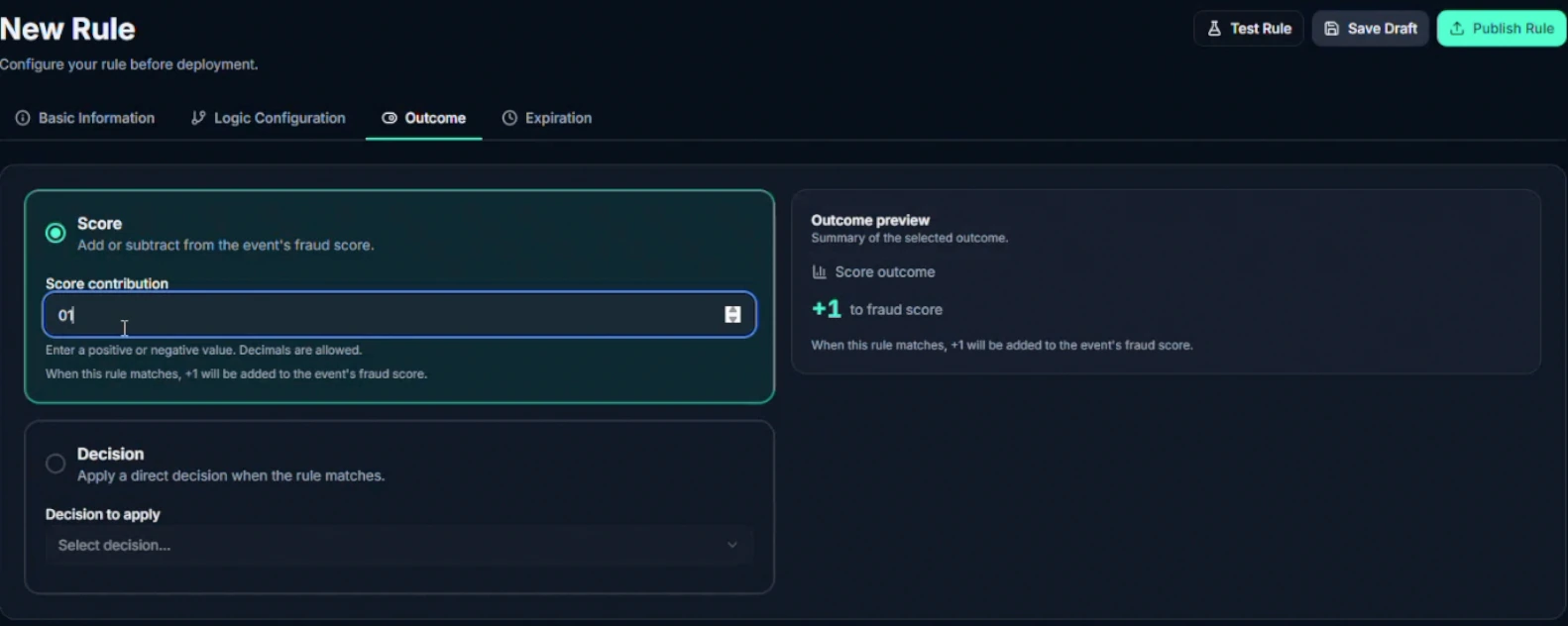
SENTR rule outcome editor with score contribution, direct decision and outcome preview controls. Enlarge view
Choose what a matching rule does

The rule outcome editor separates a score contribution from a direct decision.

Watch the controls 16 seconds · silent

A silent tour of rule configuration: open comparison, data-match and velocity options; inspect the score contribution; select a direct Review decision; open expiration settings.

Define the condition. Choose its effect. Inspect the outcome before publishing.

Choose what a matching rule does

The rule outcome editor separates a score contribution from a direct decision. Product demonstration · synthetic data.

Go deeper: Detection workbench
Choose the rule’s effect
A rule can add or subtract score—including decimal contributions—or return a direct decision. A live outcome preview shows the configured effect before publishing.
Separate testing from live impact
Test a rule, backtest against available history, or use Monitor to evaluate conditions without contributing to live scores. Monitor is a rule state, not the commercial Shadow Mode evaluation.
Keep a change history
Drafts, versions and expiration support deliberate changes. Rule analytics expose trigger trends, decision impact and backtest results so the operator can inspect what changed.

Respond to a new pattern with an inspectable change. Measure the effect before assuming the new control is better.

02 / Machine learning & AI

Learn your patterns. Make the findings understandable.

Authored rules cover patterns your team knows to look for. Unusual behaviour can still deserve attention when no existing rule describes it.

SENTR’s customer-specific anomaly model learns normal activity from clean signals, independently of authored rule outputs. It returns a separate risk score and contributing signals. Training runs overnight once sufficient suitable data is available; evaluation and training are different processes.

See current AI and what comes next →
SENTR Product viewDemo data
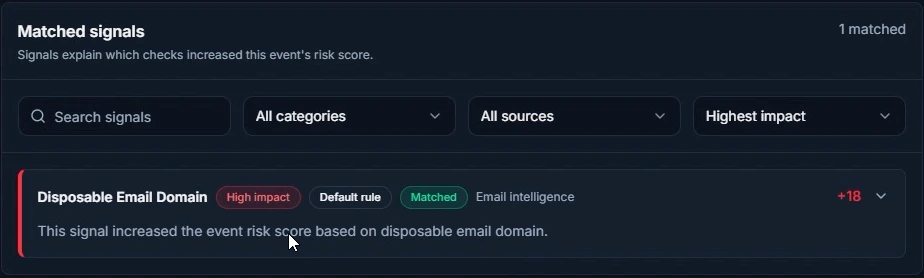
SENTR matched-signal detail: Disposable Email Domain, matched default rule, high impact and a score contribution of plus 18. Enlarge view
See the contribution behind the score

The matched rule, its impact and the recorded reason—together on the event.

The explanation has something concrete behind it: the matched check and its contribution.

See the contribution behind the score

The matched rule, its impact and the recorded reason—together on the event. Product demonstration · synthetic data.

Go deeper: Machine learning & AI
Inspect both scoring paths
Rule contributions and AI score breakdowns remain distinct. Analysts can inspect severity, exact score impact, confidence and the reasons that contributed most.
Read the explanation, then verify it
Generative AI translates relevant recorded findings into natural language. Attribution is stored for every evaluated event; quiet events need not generate a prose narrative. The language model explains the score, not the block decision.
Keep feedback accountable
Validated outcomes and corroborating signals inform the customer-model learning process. A reviewer’s override is not blindly accepted as training truth. Sector and global model tiers are available where agreed for your deployment.

Give analysts readable reasons without hiding the evidence behind them. AI scoring, the AI rule builder, the ML pipeline and automatic feature engineering extend this foundation. Agree their configuration and access for your deployment.

The scoring engine is only the beginning.

AI scoring, the AI rule builder, the ML pipeline and automatic feature engineering are available alongside complete custom rules and per-rule attribution.

Use the workbench to define event-scoped logic, inspect score contributions and test control changes. We agree the relevant AI configuration and authoring permissions during setup; availability is not a promise of autonomous live-policy changes.

Explore the AI rule builder → · Explore the ML pipeline and feature engineering

Illustrative mechanism
See which checks moved the score.An illustrative event space sits beside selected rule contributions: device velocity adds 18 and a first-seen IP adds 12. These sample contributions are not the full score. Customer-model findings are evaluated separately; the radar shape does not imply a graph-learning model.EVALUATIONRULE CONTRIBUTIONSvelocity.device +18ip.first_seen +12EVENT SPACE
See which checks moved the score.
Read the diagram

An illustrative event space sits beside selected rule contributions: device velocity adds 18 and a first-seen IP adds 12. These sample contributions are not the full score. Customer-model findings are evaluated separately; the radar shape does not imply a graph-learning model.

See which checks moved the score.

Illustrative mechanism. On smaller screens, scroll across the diagram to inspect the labels.

See which checks moved the score.An illustrative event space sits beside selected rule contributions: device velocity adds 18 and a first-seen IP adds 12. These sample contributions are not the full score. Customer-model findings are evaluated separately; the radar shape does not imply a graph-learning model.EVALUATIONRULE CONTRIBUTIONSvelocity.device +18ip.first_seen +12EVENT SPACE

An illustrative event space sits beside selected rule contributions: device velocity adds 18 and a first-seen IP adds 12. These sample contributions are not the full score. Customer-model findings are evaluated separately; the radar shape does not imply a graph-learning model.

03 / Decide

Turn risk appetite into an explicit response.

Explore decide in depth →

01 / Risk appetite

Three different controls. Three different questions.

Making every rule stricter is not the same as changing when you block. A trusted identifier should not automatically excuse every future action either.

SENTR separates rule sensitivity, decision thresholds and list influence. That gives your operator a more precise way to adapt policy to the event, market and fraud problem.

Inspect profiles, policies and lists →
SENTR Product viewDemo data
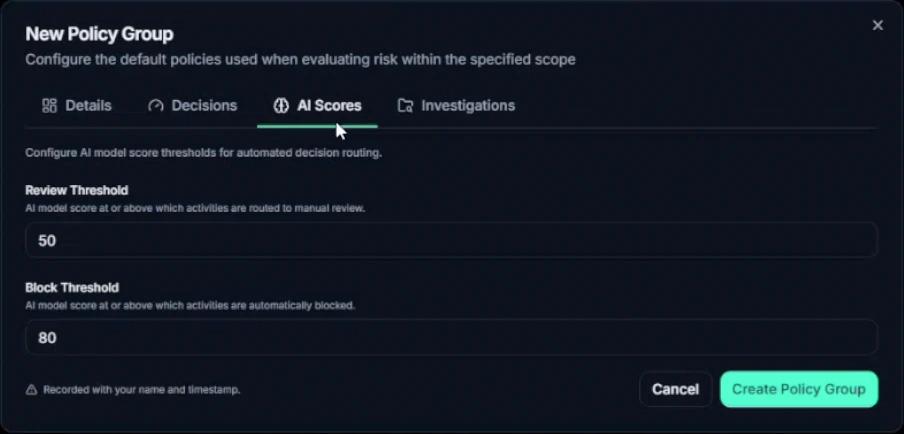
SENTR policy-group editor with separate model-score review and block threshold fields. Enlarge view
Set the point where attention becomes action

Review and block cutoffs are configured separately. Displayed values are demo settings, not recommended thresholds.

Rule sensitivity, decision cutoffs and list influence answer different questions.

Set the point where attention becomes action

Review and block cutoffs are configured separately. Displayed values are demo settings, not recommended thresholds. Product demonstration · synthetic data.

Go deeper: Risk appetite
Scoring profiles: what matches?
Adjust numeric thresholds inside rules for an event type—for example, the domain-age threshold in a registration rule. Binary conditions have no numeric threshold to shift.
Decision policies: when do we act?
Set review and block cutoffs, with rule scores and model scores on separate axes. A login and a withdrawal do not need the same appetite. Action policies separately define cases, notifications and webhooks.
Scoped lists: how much should this matter?
Set the influence score for an attribute or entity match. Add entries from profiles or in bulk, export them, and disable lists without deleting them. Keep a known customer from becoming a blanket exemption for a suspicious new session.

Change the control that is causing the problem—not the risk appetite of the whole business.

04 / Explain

Understand the decision. Keep the evidence.

Explore explain in depth →

Read the recorded contribution, inspect the relevant AI explanation and distinguish the system result from a later human override. The shared scoring and explanation foundation remains part of this operation.

01 / Governance & operability

Audit the controls—not just the decisions they produce.

When someone challenges an outcome, the question may be who changed the policy, not simply what score the event received.

SENTR records configuration changes with user attribution and timestamps, including rules, policies, lists and reason codes. Decision explanations and reasoned overrides keep system findings and human judgement distinguishable.

Inspect decision evidence and governance →
SENTR Product viewDemo data
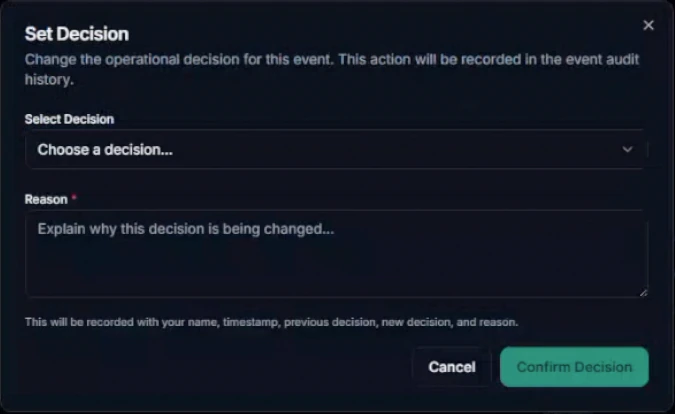
SENTR Set Decision dialog with a required written reason and notice that the person, timestamp, previous decision and new decision are recorded. Enlarge view
Change the decision. Keep the reason.

A human decision change requires a reason. The dialog identifies what will be recorded in the event history.

Keep system findings and human judgement distinguishable.

Change the decision. Keep the reason.

A human decision change requires a reason. The dialog identifies what will be recorded in the event history. Product demonstration · synthetic data.

Go deeper: Governance & operability
Query the operational trail
Audit logs are a report data source alongside events, rules, cases, profiles and integrations. Review changes and export evidence without treating the audit trail as a separate support request.
Operate access and delivery
Organisation and team settings, access policies, scoped API credentials and webhook delivery traces support the people running the deployment. Confirm authentication and data-handling requirements during technical and security review.
Keep enforcement explicit
SENTR returns the decision. Your connected application enforces the business response; configured webhooks handle downstream effects. Qualified Shadow Mode keeps SENTR out of production enforcement.

Give operators, engineering and governance a shared evidence trail. Security commitments are deployment-specific; SENTR does not claim certifications it does not hold.

05 / Investigate

Follow the connected activity to a supported outcome.

Explore investigate in depth →

01 / Connected intelligence

Open the network behind the event.

An event can look ordinary until you see the same device, session or instrument in other activity. Rebuilding those relationships manually slows every investigation.

SENTR resolves five profile families: users/accounts, devices, sessions, IPs and payment methods. Each brings together activity, risk indicators, alerts, open cases and linked profiles from the identifiers you supply.

Explore profiles and connected investigation →
SENTR Product viewDemo data
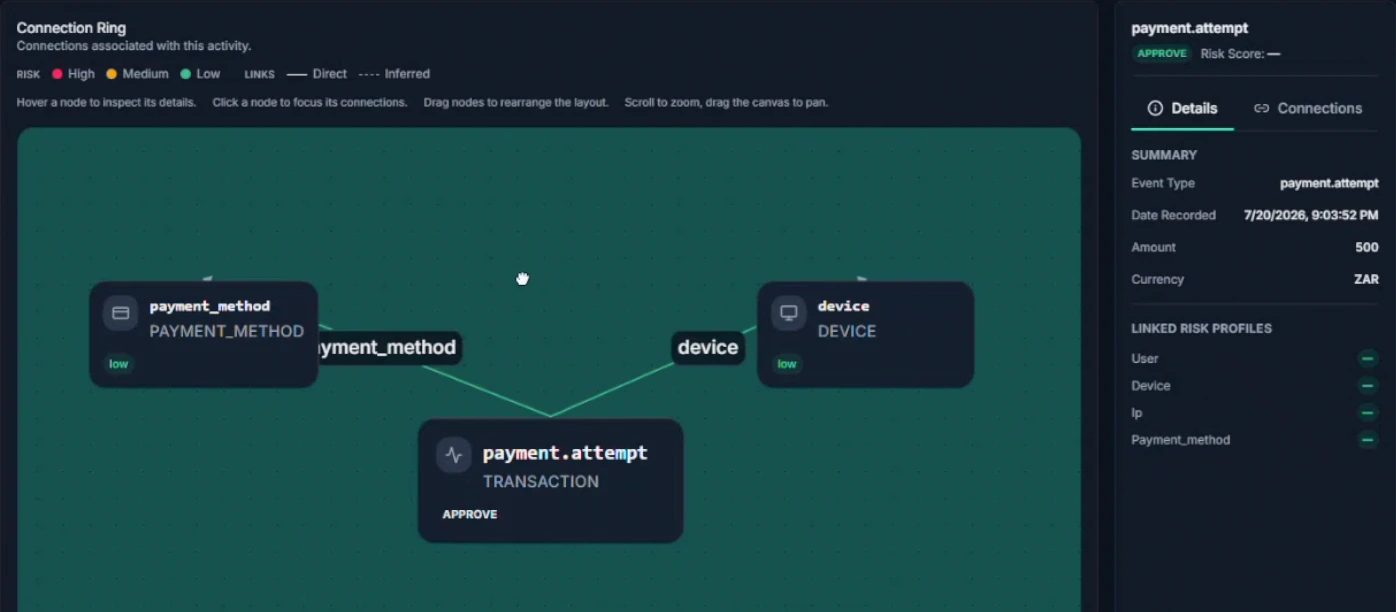
SENTR Connection Ring linking a payment-attempt event to a device and payment method, with a selected-node detail panel. Enlarge view
Follow the connection, not another spreadsheet

A payment event and its linked device and instrument in Connection Ring. A connection is an investigation lead, not a verdict.

Inspect the relationship and keep the underlying event in view.

Follow the connection, not another spreadsheet

A payment event and its linked device and instrument in Connection Ring. A connection is an investigation lead, not a verdict. Product demonstration · synthetic data.

Go deeper: Connected intelligence
Move from account to context
Overview, Activities, Linked Profiles, Cases and Connections give analysts a consistent way to explore each entity. Linked profiles expose risk, activity counts and first/last activity.
Follow the Connection Ring
Inspect direct and inferred relationships in an interactive graph. Focus a node, inspect connections, rearrange and zoom to trace related accounts, devices and instruments.
Start from the report, not only the alert
Create a case directly from a profile when a customer reports takeover or another concern. You do not need to wait for a new flagged payment to begin investigating.

Turn a suspicious connection into an investigation with context. Shared identifiers are leads—not proof of collusion or guilt.
02 / Investigation operations

Give every review an owner, a method and an outcome.

An undifferentiated alert inbox hides urgent work, repeats context gathering and leaves closed cases with conclusions nobody can compare.

Cases can start from a policy, an analyst or an external report. Group the source reference, subjects, linked activities and evidence in one workspace, then route the work through queues your team can operate.

Explore queues, cases and outcomes →
SENTR Product viewDemo data
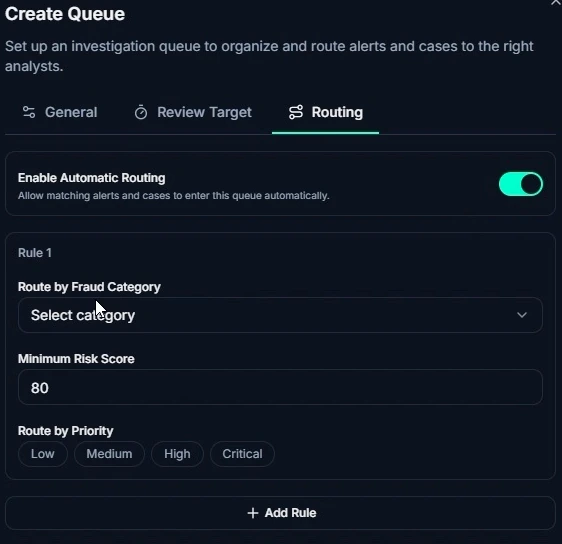
SENTR queue-routing controls for automatic routing, fraud category, minimum risk score and priority. Enlarge view
Give review work a deliberate destination

Configure queue routing by fraud category, risk score and priority.

Direct the right work to the right queue instead of treating every alert alike.

Give review work a deliberate destination

Configure queue routing by fraud category, risk score and priority. Product demonstration · synthetic data.

Go deeper: Investigation operations
Manage the work, not just the alert
Queues carry assignment, priority, aging and SLA tracking. Investigation dashboards show waiting work, case workload and analyst workload so managers can see where attention is needed.
Configure the investigation method
SENTR.Citadel lets you define case statuses, workflow transitions and investigation checklists. Different fraud problems can have different review paths without abandoning a shared case record.
Record what the person decided
An override requires a written reason and records the person, time, previous decision and new decision. Close the case with your configured business outcome and reason code; keep uncertainty distinct from confirmed fraud.

Make experienced judgement reusable and review work inspectable. Case closure records an operational outcome; it does not settle a financial dispute.

A connected case—not another isolated score.

Follow a suspicious event into linked accounts, devices and instruments. This illustrative view shows the relationships an analyst can investigate, not a customer result or automatic verdict.

DECISION · REVIEW Payout €2,450 CASE Linked payout review Acct A Acct B Device · shared IBAN · reuse Device · overlap Email · age Illustrative · not a production screenshot Illustrative · synthetic records DECISION · REVIEW Payout €2,450 Linked payout case Acct A Acct B Device · shared Device · overlap IBAN · reuse Email · age
Shared identifiers are investigation signals. They are not automatic proof of collusion or guilt.

06 / Improve

Make the outcome count beyond the case.

Explore improve in depth →

01 / Reporting & improvement

Find the rule making noise. See the work behind the number.

A lower review rate is not automatically better protection. Risk leaders need to see which rules create work, what investigators find and where genuine customers encounter friction.

The Command Center separates overview, investigation and rule analytics. A live event stream and decision mix give immediate context; rule and case outcomes help explain what the operation is doing.

Explore reporting and the improvement loop →
SENTR Product viewDemo data
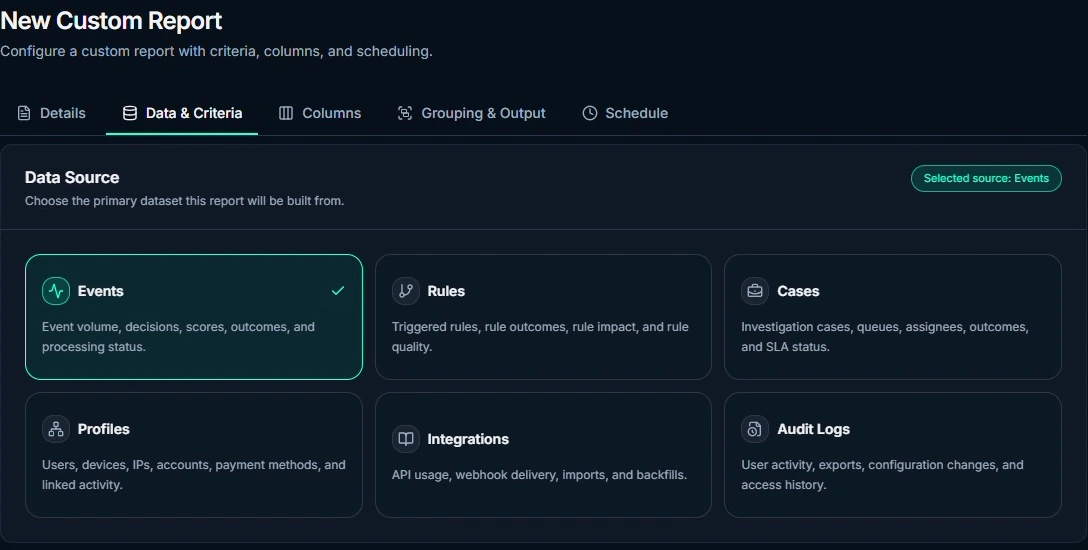
SENTR custom report builder with Events, Rules, Cases, Profiles, Integrations and Audit Logs as data sources, plus criteria, columns, grouping, output and schedule tabs. Enlarge view
Build the report around the question

SENTR.Citadel’s custom report builder: choose a data source, then shape criteria, columns, grouping and schedule.

Start with the operational question—not the spreadsheet export you happen to have.

Build the report around the question

SENTR.Citadel’s custom report builder: choose a data source, then shape criteria, columns, grouping and schedule. Product demonstration · synthetic data.

Go deeper: Reporting & improvement
Inspect rule quality
Review trigger trends, decision impact, utilisation, backtest results and noisy rules—controls generating review work without confirmed findings. Use that evidence to choose what to test next.
Start with 30+ standard reports
Explore confirmed fraud, false positives, manual versus automatic decisions, rule performance, score distributions, case outcomes, case aging, queue workload and risky profiles. Export CSV, XLSX or PDF.
Build the question your team needs answered
SENTR.Citadel custom reports use events, rules, cases, profiles, integrations and audit logs. Choose criteria, columns, grouping and output; run now or schedule. Generated output history keeps past reports accessible.

Connect operational effort to confirmed outcomes. Fraud-loss and false-positive conclusions still need reliable labels, a defined population and enough time for outcomes to mature.

Use the evidence to choose the next action: repair the inputs, test a control change or inspect the model-feedback process. Standard and custom reports help you decide where the work belongs.

Add device context where the integration supports it.

The JavaScript SDK supplies persistent device identity and web interaction signals. API-only integrations use the identifiers and context you supply. Full SENTR 360 journey reconstruction is available with the JavaScript SDK; mobile SDKs and session replay remain roadmap.

Explore device signals and integration requirements →

Put the complete operation to work on your use case.

An operator who can own rules and investigations is the starting point—not a requirement to build a large fraud department.

  • Multiple protected events, markets, providers or internal controls
  • Frequent policy change and deep investigation work
  • Enough volume and ownership to compare outcomes responsibly
  • Cross-provider or cross-event complexity that needs one customer-owned policy layer

Coexistence while you prove

  • SENTR.Citadel operator Configures rules, policies, queues, cases and reporting depth on the shared foundation.
  • SENTR.Tower owner Guided presets and a simpler review workflow, with the same engine and decision visibility.
  • Incumbent stack Can keep running production decisions while SENTR compares read-only in qualified Shadow Mode.

Illustrative workflow

Keep production on the incumbent; compare in Shadow

A PSP maps payment and payout events into SENTR.Citadel, configures portfolio rules and review queues, and runs Shadow Mode read-only beside the current decision path.

  1. Map events
  2. Portfolio rules + queues
  3. Shadow Mode
  4. Day-50 readout
Response
Compare agreement, disagreement and investigation effort — production unchanged until the committee decides
Evidence
Read-only evaluation beside the incumbent path

Cutover is a decision with evidence—not a leap of faith.

How Shadow Mode works →  ·  Compare SENTR.Citadel and SENTR.Tower →

Available · full operator control

The core controls described here are available, including SENTR 360 journey reconstruction with the JavaScript SDK. AI scoring, AI rule building, the ML pipeline and automatic feature engineering are available. We agree integration and configuration for your deployment. Qualified, free 50-day Shadow Mode is optional.

Before you decide

The questions worth asking.

Is SENTR.Tower a different fraud engine from SENTR.Citadel?

No. Both use the SENTR foundation for event scoring, AI and machine learning, explanations, investigations and outcome feedback. SENTR.Tower simplifies configuration through guided presets; SENTR.Citadel gives an experienced operator direct rule, policy and reporting control.

Compare the controls →
Who should operate SENTR.Citadel?

A named fraud or risk operator who can own configuration, review outcomes and work with the technical owner. A dedicated department is not required; the important distinction is the experience and responsibility to test rules, tune policies and manage the operating workflow.

Explore the operator role →
Can we evaluate SENTR without replacing our existing controls?

Qualified SENTR.Citadel teams can use a free, optional 50-day Shadow Mode evaluation. SENTR receives the agreed events and compares decisions read-only; your existing stack continues to enforce production decisions. Agree data access, owners and the evidence needed before starting.

Understand the evaluation →

Build a fraud operation that moves at your speed.

Inspect published pricing or bring your event map to a working session. Qualified Shadow Mode is a free, optional way to evaluate before a production decision.

Or Book a Session

Your privacy choices

Choose how you use SENTR. Your enquiry, chat and booking do not depend on accepting analytics.

Essential functionality Always active

Delivers and secures the site, remembers this choice and supports the chat or booking you request.

Measures page visits, feature use and enquiry journeys, including recognised campaign sources. Uses analytics cookies. Form answers and chat messages are not sent to Google Analytics.

Advertising trackers are disabled. The same choices apply to UK and EU visitors.

We remember this choice on this browser for up to six months. Changing an active analytics choice reloads the page to stop tracking scripts. Save any unfinished enquiry first.

Website data information