Platform · 01 Ingest

Your data. Your events. One connected risk picture.

Connect product activity, payment events, provider outputs and historical context through supported APIs, webhooks, files, databases or streams. Map the fields once, then use that context across detection, decisions and investigation.

  • File, API, webhook, DB or stream
  • Field mapping under your control
  • History backfill and scoped credentials

Data engine

Your first live event should not arrive without a past.

A returning customer can look new when the history lives elsewhere. That missing context creates work for analysts and weakens the rules that depend on prior activity.

Bring events through REST APIs, webhooks, files, databases or streams. Map your field names onto SENTR’s model and keep stable identifiers connected across users, devices, sessions, IPs and payment methods.
SENTR Product viewDemo data
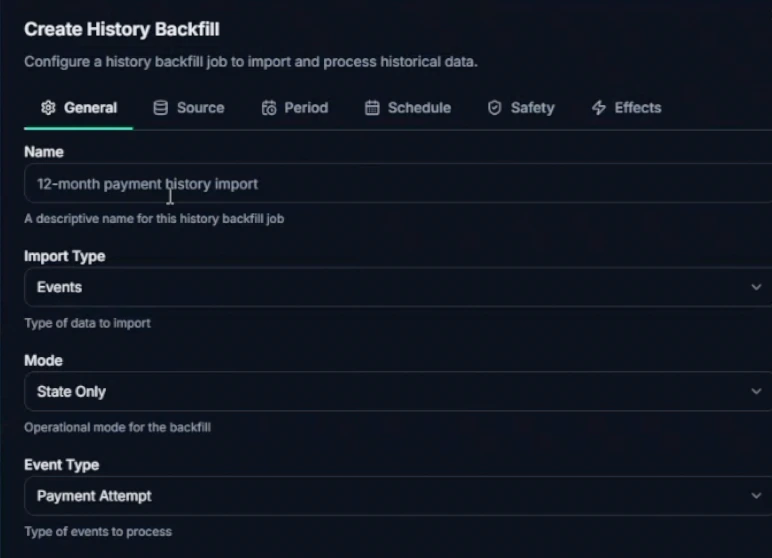
SENTR history-backfill configuration showing import type Events, State Only mode, Payment Attempt event type, and source, period, schedule, safety and effects tabs. Enlarge view
Give the next event a history

History-backfill setup. Scope the activity and processing mode before starting the import.

Historical activity gives first-seen, reuse and velocity checks the context they need.

Give the next event a history

History-backfill setup. Scope the activity and processing mode before starting the import. Product demonstration · synthetic data.

Go deeper: Data engine
Import profiles and activity separately
Entity imports establish existing accounts and profiles. History backfills add the activity that gives velocity, reuse and first-seen checks their context. One does not replace the other.
Control what a backfill changes
Choose event type, source, period, schedule, safety settings and effects. State-only processing can establish history; eligible imported data can also support customer-model training.
See the integration working
Scoped API keys, webhook signing secrets and delivery logs let engineering inspect payload traces, failures and retries instead of diagnosing the feed from missing alerts.

Keep the systems and naming conventions you already use. Give the fraud operation the history it needs to interpret the next event.

Your data should work for you—not against the integration.

Waiting for a vendor’s native connector means waiting on their roadmap. Rebuilding your entire event bus for a new fraud tool means engineering owns a second platform. Either way, analysts keep joining identifiers in spreadsheets because nothing lined up at ingest.

Send the events you already produce, map the relevant fields and backfill available history. Scoped credentials, webhooks and delivery logs give engineering the tools to validate the feed. Automated provider-specific mapping remains in development.

Illustrative mechanism
Give separate signals a connected history.Source fields pass through an agreed mapping into account, device and IP context. Stable identifiers connect later events to the right history. This illustrates the mapping mechanism, not automatic provider mapping or a required event schema.INGEST PIPELINESOURCEMAPAccountDeviceIP
Give separate signals a connected history.
Read the diagram

Source fields pass through an agreed mapping into account, device and IP context. Stable identifiers connect later events to the right history. This illustrates the mapping mechanism, not automatic provider mapping or a required event schema.

Give separate signals a connected history.

Illustrative mechanism. On smaller screens, scroll across the diagram to inspect the labels.

Give separate signals a connected history.Source fields pass through an agreed mapping into account, device and IP context. Stable identifiers connect later events to the right history. This illustrates the mapping mechanism, not automatic provider mapping or a required event schema.INGEST PIPELINESOURCEMAPAccountDeviceIP

Source fields pass through an agreed mapping into account, device and IP context. Stable identifiers connect later events to the right history. This illustrates the mapping mechanism, not automatic provider mapping or a required event schema.

How data reaches a decision

01 Your sources API · webhook · file 02 Your field map Names → common fields 03 Connected history Stable entity identifiers 04 SENTR evaluates Rules + anomaly + policy 05 Your application Enforces the response CONTEXT IN. ACCOUNTABLE DECISIONS OUT. 01 Your sources API · webhook · file 02 Your field map Names → common fields 03 Connected history Stable entity identifiers 04 SENTR evaluates Rules + anomaly + policy 05 Your application Enforces the response YOUR SYSTEM KEEPS ENFORCEMENT.
Map the events and identifiers you supply, connect historical activity, and evaluate the new event. SENTR returns a result; your application enforces it. Automated provider-specific mapping remains in development.
Inspect the integration responsibilities

Integration contract

  1. Events you already produce File, REST, CSV, webhook, database or stream—paths your team can operate and monitor.
  2. Field mapping you control Map your payload fields onto SENTR event types, including custom events. Provider-specific automatic mapping is in development.
  3. Identifiers & history Joins across users, devices, sessions, IPs and payment methods—plus backfill when stateful rules need prior context.
  4. Observe, then produce The same mapping can feed read-only comparison first. Production write-back stays a separate, explicit decision.

What you configure

Ingestion

File · REST · CSV · webhook · DB · stream

Choose the ingestion path that fits your existing systems.

Entities

Users · devices · sessions · IPs · payment methods

Consistent identifiers connect event history to entity profiles and investigations.

Web signals

JavaScript SDK

Device and web signals are available. Full SENTR 360 journey reconstruction is available with the JavaScript SDK. Mobile SDK timing is on product status.

Operability

Keys · signing · delivery logs

Scoped keys, signed webhooks and delivery logs help engineering test and troubleshoot the integration.

Put the integration work to use twice.

Illustrative workflow

Map once. Compare read-only. Decide later.

A payments team maps payment and payout events plus merchant identifiers into SENTR. Shadow Mode runs on that feed while production still decides in the incumbent stack.

  1. Map payment + payout
  2. Merchant identifiers
  3. Shadow Mode (read-only)
  4. Incumbent still decides
Response
Write-back is a separate commercial decision after the evaluation window
Evidence
Mapping work already done — engineering effort compounds

Engineering effort compounds. Cutover stays optional until the evidence is good enough.

Once events are mapped, operators compose appetite in Decisions & rules. When you are ready to compare read-only, see how Shadow Mode works →

Know what the device feed adds—and what an API cannot invent.

Device context helps connect accounts and sessions. It only works when those signals are actually collected and supplied.

JavaScript SDK · available

Collect a persistent device fingerprint and interaction signals, including clicks, time per step, tab changes and connection loss. Browser automation and developer-tools signals provide additional context—not automatic proof of fraud.

REST API · bring your identifiers

Without the SDK, supply your own consistent device fingerprint and the session signals you possess. Backend payment data alone cannot reconstruct the browser journey.

SENTR 360 · available

Full customer-journey reconstruction is available with the JavaScript SDK. It extends the recorded risk-evaluation path with connected journey context. Native mobile SDKs and session replay remain roadmap.

Check integration and SDK availability →

Keep the work connected

What happens next?

What comes in
Your events, identifiers and relevant history.
What moves forward
Mapped context the rules and customer model can actually use.

With the context connected, inspect how SENTR finds the risk.

Continue to Detect

SENTR.Tower starts with a guided integration. SENTR.Citadel supports deeper configuration. Neither can infer data your systems never supply.

Compare the exact controls ↗

Before you decide

The questions worth asking.

Does SENTR need to replace our payment provider?

No. SENTR can evaluate mapped events alongside payment providers and internal systems. It is an independent decision and operations layer, not a payment processor. You need a supported data path and explicit response handling; named-provider integrations are not assumed to be prebuilt connectors.

See the integration model →
What needs to be mapped before an event can be useful?

Agree the event type, required fields, stable identifiers, available history and the action your system should take on the response. Ingesting a payload alone does not guarantee useful connected context or a safe production integration. History backfill helps establish the state needed for reuse and velocity checks.

Work through a schema →

Bring a schema. Leave with an integration plan.

Work through your sources, identifiers, history and decision response with us. Request API documentation during a technical review.

Your privacy choices

Choose how you use SENTR. Your enquiry, chat and booking do not depend on accepting analytics.

Essential functionality Always active

Delivers and secures the site, remembers this choice and supports the chat or booking you request.

Measures page visits, feature use and enquiry journeys, including recognised campaign sources. Uses analytics cookies. Form answers and chat messages are not sent to Google Analytics.

Advertising trackers are disabled. The same choices apply to UK and EU visitors.

We remember this choice on this browser for up to six months. Changing an active analytics choice reloads the page to stop tracking scripts. Save any unfinished enquiry first.

Website data information